Kroesus Entertainment · Power Tools
Choose languageEnglishDeutschEspañolFrançais
Built for live performance

StagePilot Pro 4Live Backing Tracks & Setlist Control for REAPER

StagePilot Pro 4 turns REAPER on Mac into a focused live performance system for backing tracks, playbacks, setlists, synchronized lyrics and visuals. Control the show wirelessly from phones or tablets over your own local network.

REAPER live workflowBacking tracks & playbacksPhone & tablet controlLyrics & visualsLocal network
Try free for 14 daysStagePilot Pro 4 Demo
€35 · One-time purchase
Secure checkout powered by Paddle
StagePilotPro Essentials
Free companion tools for REAPER

StagePilotPro Essentials

Three focused REAPER tools in one free app: Item Notes → Video Window, TempoLab and Region Control.

Free · macOS · Quick setup
What StagePilot Pro does

Turn REAPER into a stage-friendly playback system

REAPER stays the audio host. StagePilot Pro adds the live control surface: setlists, transport, synchronized lyrics, visual information and browser-based access for the people on stage. It is built for musicians who already trust REAPER for playback but want a cleaner, faster live workflow.

Backing tracks & playbacks

Run your audio, stems and click tracks in the REAPER project you already use. StagePilot Pro does not replace the DAW; it gives the show a dedicated performance interface so you do not have to operate the full REAPER project from the stage.

Setlist control

Navigate songs and control the live set from a phone or tablet. Keep the computer at the playback rig while performers get the controls and song information they actually need.

Synchronized lyrics & visuals

Prepare timed lyric and visual blocks, then display them on connected devices during the performance. Separate 16:9 and 9:16 layouts help adapt the content to stage screens, tablets and phones.

Who StagePilot Pro is for
Use cases

For bands, solo performers, live musicians and theatre playback

StagePilot Pro is useful wherever REAPER is already doing the audio playback and people on stage need a simple, synchronized view of the show.

Bands & cover bands

Manage a live set with backing tracks, playbacks and song changes while multiple band members can view lyrics, cues or song information on their own devices.

Solo performers & singers

Keep REAPER running the show while your phone or tablet becomes the practical stage remote and lyric display.

Live musicians & backing track performers

Use REAPER for reliable playback while connected phones or tablets display synchronized lyrics, cues and song information for the people on stage.

Theatre & musical productions

For productions that already use REAPER as the playback host, StagePilot Pro can provide a simplified setlist and information layer for operators or performers. It does not claim to replace dedicated cue, DMX or timecode systems.

REAPER live workflow

Playback, click track and show control without putting REAPER on every screen

StagePilot Pro is designed around a simple separation of duties: REAPER handles the project and audio playback, while StagePilot provides the stage-facing controls and displays. Your backing tracks, stems and click track remain inside the REAPER session where your routing and audio setup already live.

Connect once over your local network, open StagePilot in a browser and access the setlist, transport, lyrics, cues and visuals from phones or tablets. No dedicated mobile app is required, and the live workflow does not depend on an internet connection.

How it works
How it works

From REAPER to your live devices in three steps

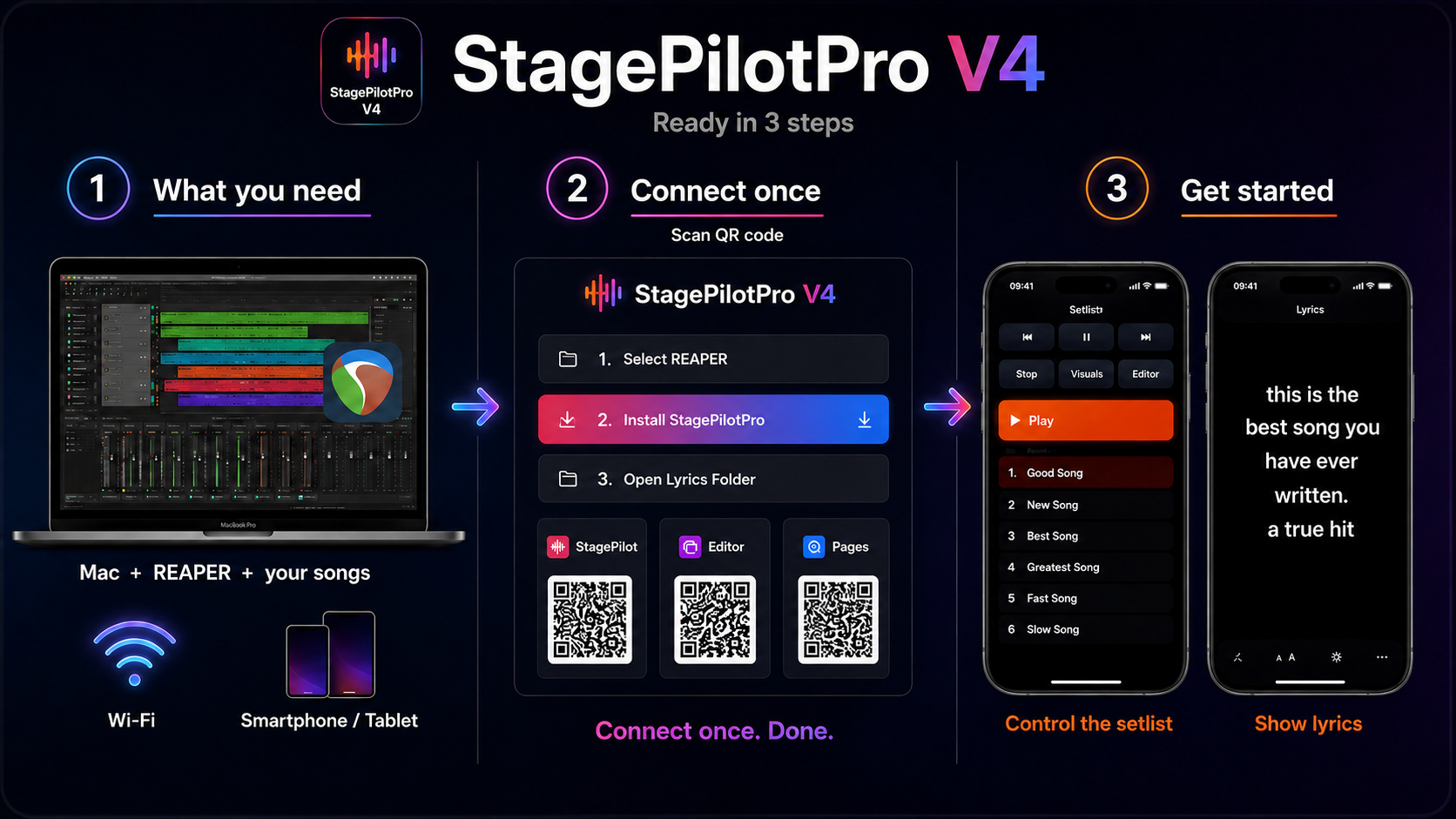
Install StagePilot Pro 4 into the REAPER webroot, connect your devices by QR code and use the browser interface for setlist control, lyrics and visual information during the show.

StagePilot Pro 4 workflow: REAPER on Mac, Wi-Fi connection, phone and tablet setlist control and synchronized lyrics
Frequently asked questions
FAQ

StagePilot Pro 4 questions

What is StagePilot Pro 4?
StagePilot Pro 4 is a live performance control layer for REAPER on Mac. REAPER remains the audio host while StagePilot provides browser-based setlist control, transport, synchronized lyrics, visuals and song information for connected phones and tablets.
Does StagePilot Pro play backing tracks itself?
REAPER plays the audio. StagePilot Pro controls and presents the live workflow around that REAPER project. This keeps your existing routing, stems, backing tracks and click tracks inside REAPER.
Can I control REAPER from a phone or tablet?
Yes. Connected devices open the StagePilot interface in a browser over the local network. No dedicated mobile app is required.
Can multiple devices display lyrics?
StagePilot Pro is designed for multiple browser clients. The practical number of connected devices depends mainly on the capacity and quality of your local Wi‑Fi network.
Do I need internet during the show?
The StagePilot live connection is local. Once your setup is installed, the stage workflow is designed to run over your own local network rather than depend on a cloud connection.
Does it work with click tracks?
Your click track stays in REAPER together with the rest of the playback project. StagePilot Pro does not generate the click; it controls the live REAPER workflow around it.
Can I use StagePilot Pro for theatre or musicals?
It can be useful when REAPER already handles the production playback and you want a simpler setlist, lyric or information interface. StagePilot Pro does not claim to replace dedicated lighting, timecode or full theatre cue systems.
Which Macs are supported?
StagePilot Pro 4 is made for macOS and the current installer supports Intel Macs and Apple Silicon.
Can I test StagePilot Pro before buying?
Yes. A 14-day demo is available with the StagePilot Pro 4 workflow so you can test it in your own REAPER and network setup before purchasing.

Try or buy StagePilot Pro 4

Ready to turn REAPER into your live playback rig?

Try StagePilot Pro 4 for 14 days or purchase the one-time license securely through Paddle.